Get Started
การตั้งค่า IP Address และ DNS Server บนระบบปฏิบัติการ Windows เป็นขั้นตอนสำคัญสำหรับการใช้งานระบบเครือข่ายภายใน (Local Area Network) เช่น การเชื่อมต่อไปยัง Local DNS Server, Docker Service, หรือ Web Application ภายในองค์กร
เอกสารนี้อธิบายขั้นตอนการตั้งค่า IPv4 บน Windows เพื่อให้เครื่องสามารถใช้งาน Local DNS ได้อย่างถูกต้อง
กด Win + R พิมพ์ ncpa.cpl Enter ระบบจะเปิดหน้า Network Connections ทันที
วิธีนี้เหมาะสำหรับผู้ดูแลระบบและช่วยลดขั้นตอนการเข้า Control Panel หลายชั้น
Configure IPv4 on Windows (CLI)
คำสั่งทั้งหมดที่ใช้ใน Command Prompt หรือ PowerShell ต้อง Run as Administrator.
Check Network Interface
ตรวจสอบชื่อ Network Interface ที่กำลังใช้งาน เช่น Wi-Fi หรือ Ethernet
netsh interface show interfaceSet DNS Server (IPv4)
กำหนด DNS Server แบบ Static เพื่อใช้งาน Local DNS ควรเปลี่ยนชื่อ interface “Wi-Fi” ให้ตรงกับชื่อ interface ที่ใช้อยู่
netsh interface ip set dnsservers name="Wi-Fi" static 172.22.110.1 primaryFlush DNS Cache
ล้าง DNS cache เพื่อให้ Windows ใช้งานค่า DNS ใหม่ทันที
ipconfig /flushdnsReset DNS to DHCP
คืนค่า DNS ให้รับอัตโนมัติจาก DHCP เมื่อเลิกใช้งาน Local DNS
netsh interface ip set dnsservers name="Wi-Fi" source=dhcp
ipconfig /flushdns
Configure IPv4 on Windows (GUI)
Open Network Connections
เปิดหน้า Network Connections โดยใช้วิธีลัด ncpa.cpl
หรือเข้าเมนูผ่าน Control > Network and Internet > Network and Sharing Center > Change Adapter Settings
Select Active Network Adapter
เลือก Network Adapter ที่กำลังใช้งานจริง เช่น Wi-Fi หรือ Ethernet จากนั้นคลิกขวา และเลือก Properties
Open IPv4 Settings
ภายในหน้าต่าง Properties เลือก Internet Protocol Version 4 (TCP/IPv4) แล้วคลิกปุ่ม Properties
IPv4 Configuration Screen
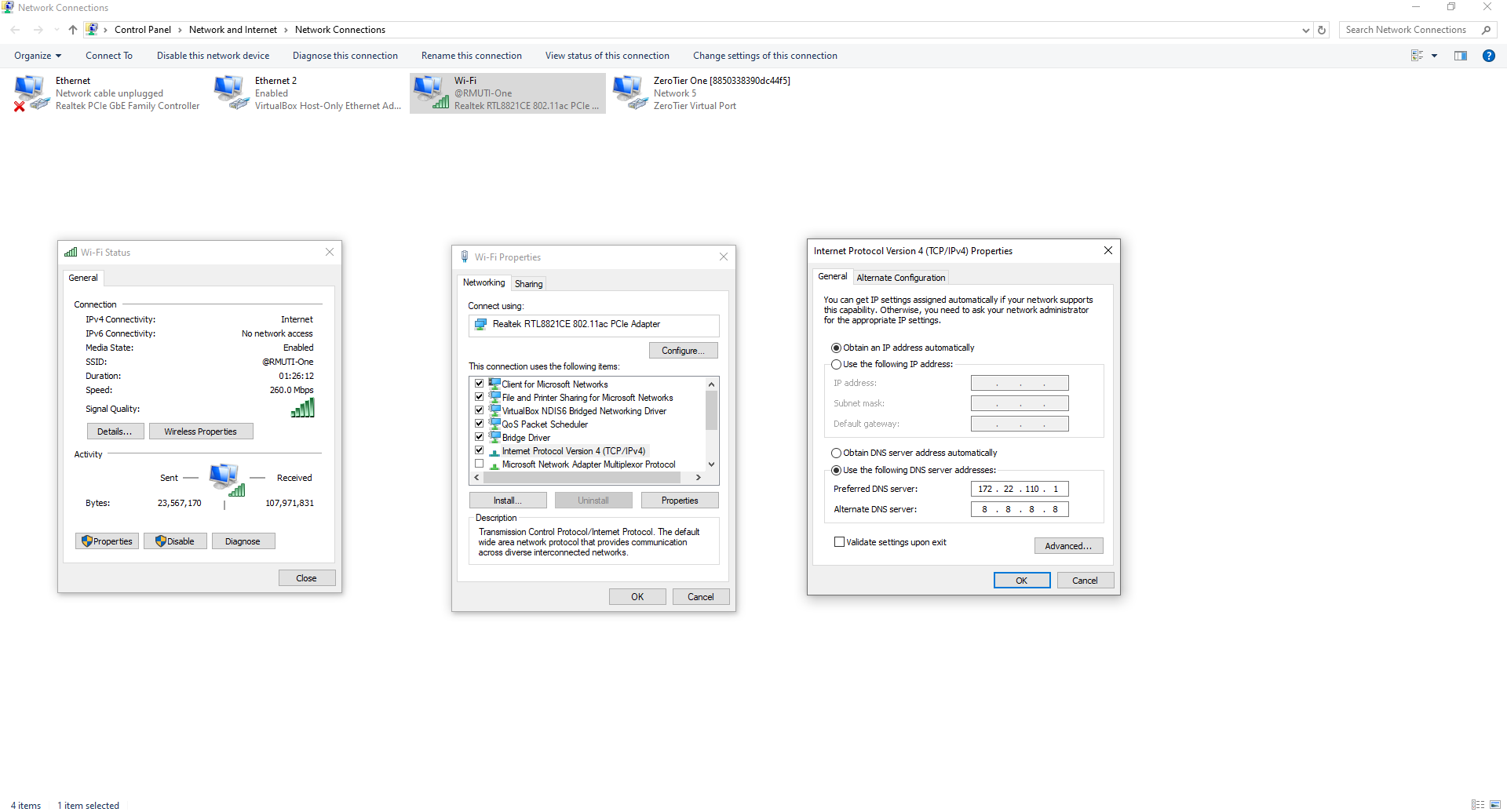
ในหน้าจอ Internet Protocol Version 4 (TCP/IPv4) Properties จะมีตัวเลือกหลักดังนี้
IP Address Configuration
Obtain an IP address automatically ใช้กรณีรับ IP จาก DHCP (เช่น Router)
Use the following IP address ใช้กรณีกำหนด IP แบบ Static เหมาะสำหรับเครื่องที่ต้องเข้าถึงได้เป็นประจำโดยไม่เปลี่ยน IP
DNS Configuration
Obtain DNS server address automatically ใช้ DNS จาก Router หรือ DHCP
Use the following DNS server addresses ใช้กำหนด DNS เอง เช่น Local DNS Server ภายในองค์กร
- Preferred DNS server
172.22.110.1 - Alternate DNS server
8.8.8.8
หากใช้งาน Local DNS ควรกำหนด Preferred DNS เป็น IP ของ DNS Server ภายในก่อนเสมอ
Example Use Case Local DNS
การตั้งค่า DNS แบบกำหนดเองช่วยให้สามารถเรียกใช้งาน Service ภายในด้วยชื่อโดเมนได้ เช่น
app.addp.siteregistry.internaldocs.landocs.local
เหมาะสำหรับระบบ
- Docker
- Reverse Proxy
- Internal Web Application
Tips
- ตรวจสอบว่าเลือก Network Adapter ถูกต้อง (หลีกเลี่ยง Virtual Adapter หากไม่ใช้งาน)
- ควรใช้ Static IP สำหรับ Server หรือเครื่อง Admin
- หลังตั้งค่าเสร็จ สามารถทดสอบด้วยคำสั่ง
ping docs.addp.site- หาก DNS ไม่ทำงานหรือทำงานช้าให้ทำการล้างข้อมูลแคช DNS เก่าของเครื่อง
ipconfig /flushdns- ตรวจสอบ IP ของเครื่องทั้งหมด
ipconfig /all- ตรวจสอบการทำงานของ DNS
tracert docs.addp.site- ตรวจสอบ IP ของ local dns โดยเลือกคำสั่ง nslookup ตามที่ต้องการ
nslookup docs.addp.site 172.22.110.1
# or
nslookup docs.addp.site
# nslookup <domain> <ip-dns>
เมื่อกำหนดค่าเรียบร้อยกด OK เพื่อบันทึกการตั้งค่า Windows จะเริ่มใช้งานค่าใหม่ทันทีโดยไม่ต้อง Restart เครื่อง
หากเข้าใช้งานไม่ได้ ตรวจสอบการตั้งค่า DNS ของเครื่อง ให้ชี้มาที่ 172.22.110.1